
Login functionality is one of the most common requirements in modern web applications. Almost every application requires users to authenticate themselves before accessing protected resources.
In this tutorial, we will build a simple Spring Boot login application using Spring Data JPA, H2 Database, Java 25, HTML, CSS, and JavaScript. The application will validate user credentials stored in the database and redirect users to a welcome page after successful login. We will also implement client-side validation to display appropriate error messages when required fields are left empty.
By the end of this tutorial, you will have a complete understanding of how a basic login system works in a Spring Boot MVC application.
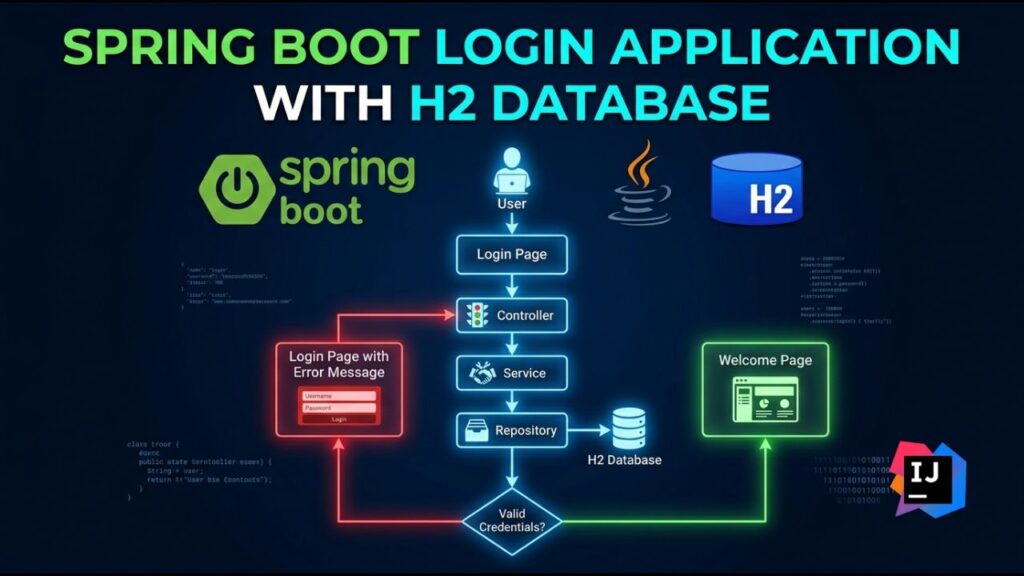
Table of Contents
Prerequisites and Technologies Used
Before starting this project, make sure the following software is installed on your machine:
- Java 25
- IntelliJ IDEA or Eclipse
- Maven
- Git (Optional)
Technologies Used
- Java 25
- Spring Boot
- Spring Data JPA
- H2 Database
- Thymeleaf
- HTML5
- CSS3
- JavaScript
Use Spring Initializer
Open Spring Initializr: http://start.spring.io/
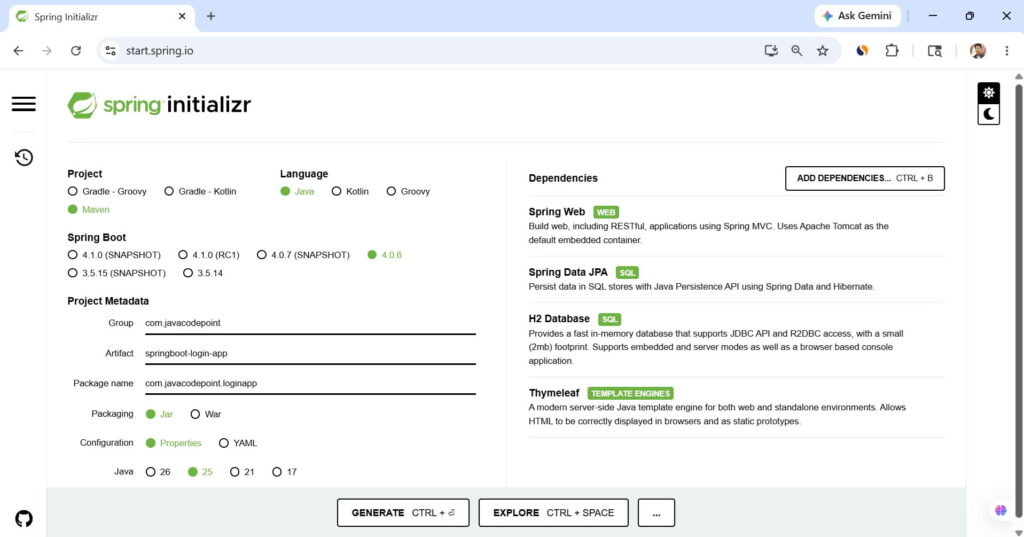
Now, generate the application > extract the zip file > open the folder in IntelliJ IDEA
Project Structure
springboot-login-app
│
├── src/main/java
│   └── com.javacodepoint.loginapp
│       ├── controller
│       │   └── LoginController.java
│       │
│       ├── entity
│       │   └── User.java
│       │
│       ├── repository
│       │   └── UserRepository.java
│       │
│       ├── service
│       │   └── UserService.java
│       │
│       ├── DataLoader.java
│       └── SpringbootLoginAppApplication.java
│
├── src/main/resources
│   ├── templates
│   │   ├── login.html
│   │   └── welcome.html
│   │
│   ├── static
│   │   ├── css
│   │   │   └── style.css
│   │   │
│   │   └── js
│   │       └── validation.js
│   │
│   └── application.properties
│
└── pom.xmlProject Files
Create all the application files according to the above project structure one by one.
<?xml version="1.0" encoding="UTF-8"?>
<project xmlns="http://maven.apache.org/POM/4.0.0" xmlns:xsi="http://www.w3.org/2001/XMLSchema-instance"
	xsi:schemaLocation="http://maven.apache.org/POM/4.0.0 https://maven.apache.org/xsd/maven-4.0.0.xsd">
	<modelVersion>4.0.0</modelVersion>
	<parent>
		<groupId>org.springframework.boot</groupId>
		<artifactId>spring-boot-starter-parent</artifactId>
		<version>4.0.6</version>
		<relativePath/> <!-- lookup parent from repository -->
	</parent>
	<groupId>com.javacodepoint</groupId>
	<artifactId>springboot-login-app</artifactId>
	<version>0.0.1-SNAPSHOT</version>
	<name/>
	<description/>
	<url/>
	<licenses>
		<license/>
	</licenses>
	<developers>
		<developer/>
	</developers>
	<scm>
		<connection/>
		<developerConnection/>
		<tag/>
		<url/>
	</scm>
	<properties>
		<java.version>25</java.version>
	</properties>
	<dependencies>
		<dependency>
			<groupId>org.springframework.boot</groupId>
			<artifactId>spring-boot-h2console</artifactId>
		</dependency>
		<dependency>
			<groupId>org.springframework.boot</groupId>
			<artifactId>spring-boot-starter-data-jpa</artifactId>
		</dependency>
		<dependency>
			<groupId>org.springframework.boot</groupId>
			<artifactId>spring-boot-starter-thymeleaf</artifactId>
		</dependency>
		<dependency>
			<groupId>org.springframework.boot</groupId>
			<artifactId>spring-boot-starter-webmvc</artifactId>
		</dependency>

		<dependency>
			<groupId>com.h2database</groupId>
			<artifactId>h2</artifactId>
			<scope>runtime</scope>
		</dependency>
		<dependency>
			<groupId>org.springframework.boot</groupId>
			<artifactId>spring-boot-starter-data-jpa-test</artifactId>
			<scope>test</scope>
		</dependency>
		<dependency>
			<groupId>org.springframework.boot</groupId>
			<artifactId>spring-boot-starter-thymeleaf-test</artifactId>
			<scope>test</scope>
		</dependency>
		<dependency>
			<groupId>org.springframework.boot</groupId>
			<artifactId>spring-boot-starter-webmvc-test</artifactId>
			<scope>test</scope>
		</dependency>
	</dependencies>

	<build>
		<plugins>
			<plugin>
				<groupId>org.springframework.boot</groupId>
				<artifactId>spring-boot-maven-plugin</artifactId>
			</plugin>
		</plugins>
	</build>

</project>
spring.application.name=springboot-login-app
server.port=8080

# H2 Database Configuration
spring.datasource.url=jdbc:h2:mem:testdb
spring.datasource.driverClassName=org.h2.Driver
spring.datasource.username=sa
spring.datasource.password=

# JPA Configuration
spring.jpa.hibernate.ddl-auto=update
spring.jpa.show-sql=true

# H2 Console
spring.h2.console.enabled=true
spring.h2.console.path=/h2-console
package com.javacodepoint.loginapp.entity;

import jakarta.persistence.*;

@Entity
@Table(name = "users")
public class User {
    @Id
    @GeneratedValue(strategy = GenerationType.IDENTITY)
    private Long id;
    private String username;
    private String password;

    public User() {
    }

    public User(String username, String password) {
        this.username = username;
        this.password = password;
    }

    public Long getId() {
        return id;
    }

    public String getUsername() {
        return username;
    }

    public void setUsername(String username) {
        this.username = username;
    }

    public String getPassword() {
        return password;
    }

    public void setPassword(String password) {
        this.password = password;
    }
}
package com.javacodepoint.loginapp.repository;

import com.javacodepoint.loginapp.entity.User;
import org.springframework.data.jpa.repository.JpaRepository;

public interface UserRepository extends JpaRepository<User, Long> {
    User findByUsernameAndPassword(String username, String password);
}
package com.javacodepoint.loginapp.service;

import com.javacodepoint.loginapp.entity.User;
import com.javacodepoint.loginapp.repository.UserRepository;
import org.springframework.beans.factory.annotation.Autowired;
import org.springframework.stereotype.Service;

@Service
public class UserService {
    @Autowired
    private UserRepository userRepository;

    public boolean validateUser(String username, String password) {
        User user = userRepository.findByUsernameAndPassword(username, password);
        return user != null;
    }
}
package com.javacodepoint.loginapp;

import com.javacodepoint.loginapp.entity.User;
import com.javacodepoint.loginapp.repository.UserRepository;
import org.springframework.boot.CommandLineRunner;
import org.springframework.stereotype.Component;

@Component
public class DataLoader implements CommandLineRunner {
    private final UserRepository userRepository;

    public DataLoader(UserRepository userRepository) {
        this.userRepository = userRepository;
    }

    @Override
    public void run(String... args) {
        userRepository.save(new User("admin", "admin123"));
    }
}
package com.javacodepoint.loginapp.controller;

import com.javacodepoint.loginapp.service.UserService;
import org.springframework.beans.factory.annotation.Autowired;
import org.springframework.stereotype.Controller;
import org.springframework.ui.Model;
import org.springframework.web.bind.annotation.*;

@Controller
public class LoginController {
    @Autowired
    private UserService userService;

    @GetMapping("/")
    public String loginPage() {
        return "login";
    }

    @PostMapping("/login")
    public String login(@RequestParam String username, @RequestParam String password, Model model) {
        boolean isValid = userService.validateUser(username, password);
        if (isValid) {
            model.addAttribute("username", username);
            return "welcome";
        } else {
            model.addAttribute("error", "Invalid Username or Password");
            return "login";
        }
    }
}
package com.javacodepoint.loginapp;

import org.springframework.boot.SpringApplication;
import org.springframework.boot.autoconfigure.SpringBootApplication;

@SpringBootApplication
public class SpringbootLoginAppApplication {

	public static void main(String[] args) {
		SpringApplication.run(SpringbootLoginAppApplication.class, args);
	}

}
<!DOCTYPE html>
<html xmlns:th="http://www.thymeleaf.org">
<head><title>Login Page</title>
    <link rel="stylesheet" th:href="@{/css/style.css}">
    <script th:src="@{/js/validation.js}"></script>
</head>
<body>
<div class="login-container"><h2>User Login</h2>
    <form action="/login" method="post" onsubmit="return validateForm()"><input type="text" id="username"
                                                                                name="username"
                                                                                placeholder="Enter Username"> <input
            type="password" id="password" name="password" placeholder="Enter Password">
        <button type="submit">Login</button>
    </form>
    <p id="validationMessage"></p>
    <p class="error" th:text="${error}"></p></div>
</body>
</html><!DOCTYPE html>
<html xmlns:th="http://www.thymeleaf.org">
<head><title>Welcome Page</title>
<link rel="stylesheet" th:href="@{/css/style.css}">
</head>
<body>
<div class="welcome-container"><h1> Welcome, <span th:text="${username}"></span></h1>
<p>Login Successful!</p></div>
</body>
</html>body {
font-family: Arial;
background-color: #f4f4f4;
}
.login-container,
.welcome-container {
width: 350px;
margin: 100px auto;
background: white;
padding: 30px;
border-radius: 10px;
box-shadow: 0 0 10px rgba(0, 0, 0, 0.2);
}
h2,
h1 {
text-align: center;
}
input {
width: 93%;
padding: 10px;
margin-top: 15px;
}
button {
width: 100%;
padding: 10px;
margin-top: 20px;
background-color: #007bff;
color: white;
border: none;
cursor: pointer;
}
button:hover {
background-color: #0056b3;
}
.error {
color: red;
text-align: center;
margin-top: 10px;
}
#validationMessage {
color: red;
text-align: center;
}function validateForm() {
let username = document.getElementById("username").value;
let password = document.getElementById("password").value;
let message = document.getElementById("validationMessage");
if (username.trim() === "") {
message.innerHTML = "Username is required";
return false;
}
if (password.trim() === "") {
message.innerHTML = "Password is required";
return false;
}
return true;
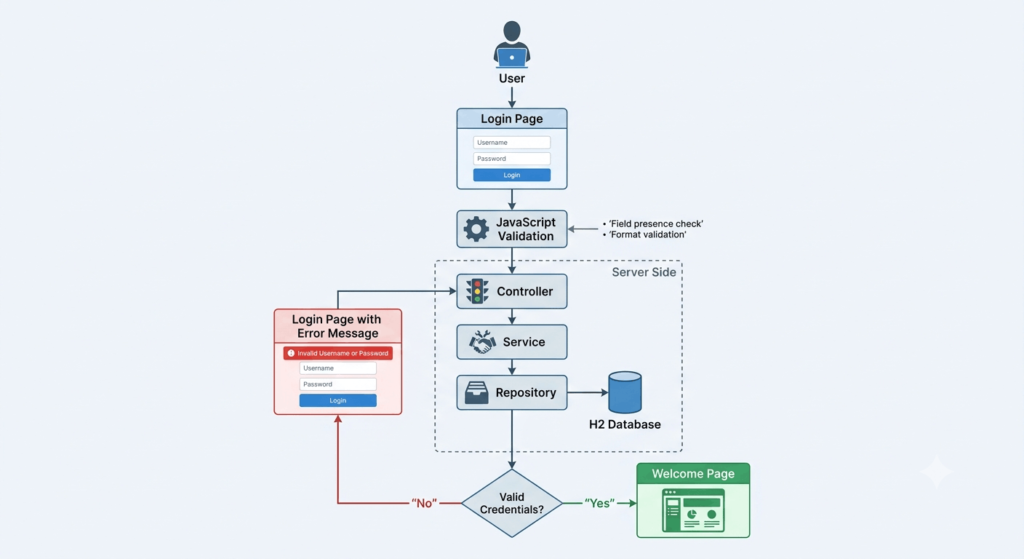
}Application Flow Diagram
Run the Application
Start the application using Maven:
mvn spring-boot:run
Or run the main class directly from IntelliJ IDEA.
Open the browser and access:
http://localhost:8080
Use the following credentials:
Username : admin
Password : admin123
Access H2 Console
http://localhost:8080/h2-console
Configuration:
JDBC URL : jdbc:h2:mem:testdb
Username : sa
Password : leave empty
Conclusion
In this tutorial, we developed a complete Login Application using Spring Boot, Spring Data JPA, H2 Database, Java, HTML, CSS, and JavaScript.
The application demonstrates how frontend validation, backend processing, database interaction, and page navigation work together in a Spring Boot MVC application. Although this example uses plain-text passwords for simplicity, production applications should always use Spring Security and encrypted password storage mechanisms such as BCrypt.
This project provides a strong foundation for implementing more advanced authentication features such as user registration, password reset functionality, role-based authorization, Spring Security integration, and JWT-based authentication.