
Sending emails is a common requirement in modern applications for notifications, alerts, customer communication, report sharing, and contact forms. In this tutorial, we will build a complete Spring Boot email sending application using Gmail SMTP.
The application supports multiple recipients, CC, BCC, rich HTML email content, multiple file attachments, asynchronous email processing, validation, logging, and a responsive Bootstrap-based user interface.
The complete source code is available on GitHub, and this article focuses on the project architecture, configuration, application flow, and execution steps.
Table of Contents
Prerequisites
Before starting, ensure the following software is installed:
- Java 25
- Maven 3.9+
- IntelliJ IDEA / Eclipse / VS Code
- Gmail Account
- Modern Web Browser (Chrome, Edge, Firefox)
Project Structure
email-sending-with-attachments
│
├── src
│   ├── main
│   │   ├── java
│   │   │   └── com.javacodepoint.email
│   │   │       ├── config
│   │   │       ├── constant
│   │   │       ├── controller
│   │   │       ├── dto
│   │   │       ├── exception
│   │   │       ├── service
│   │   │       ├── validator
│   │   │       └── EmailSendingWithAttachmentsApplication.java
│   │   │
│   │   └── resources
│   │       ├── static
│   │       │   ├── css
│   │       │   └── js
│   │       │
│   │       ├── templates
│   │       │   └── index.html
│   │       │
│   │       └── application.properties
│   │
│   └── test
│
├── pom.xml
│
└── README.md
Gmail App Password Configuration
Google no longer allows applications to access Gmail accounts using your normal Gmail password.
Instead, you must generate an App Password.
Step 1: Enable Two-Factor Authentication
Open your Google Account settings.
Navigate to:
Security → 2-Step Verification
Enable two-factor authentication.
Step 2: Generate App Password
Navigate to:
Security → App Passwords
Create a new App Password.
Example:
abcd efgh ijkl mnop
Copy this password and keep it safe.
Step 3: Configure application.properties
spring.mail.host=smtp.gmail.com
spring.mail.port=587
spring.mail.username=your-email@gmail.com
spring.mail.password=your-app-password

spring.mail.properties.mail.smtp.auth=true
spring.mail.properties.mail.smtp.starttls.enable=true

spring.servlet.multipart.max-file-size=10MB
spring.servlet.multipart.max-request-size=20MB
Replace the username and password values with your Gmail credentials and the generated App Password.
Application Architecture
The application follows a layered architecture.
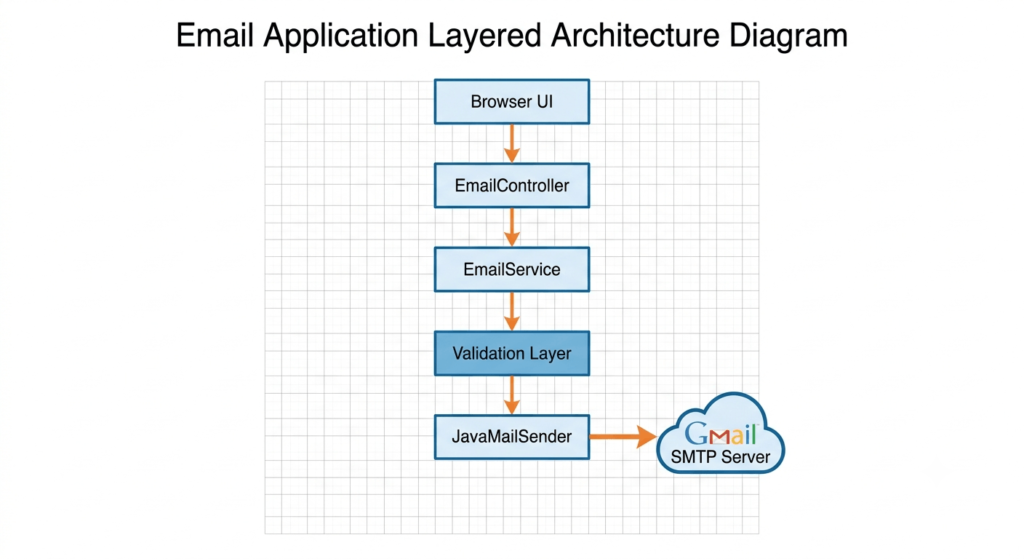
Frontend Layer
The frontend is built using:
- Bootstrap 5
- Quill Rich Text Editor
- Pure JavaScript
Responsibilities:
- Collect email information
- Upload attachments
- Perform basic validation
- Submit data to the backend
Controller Layer
The controller receives requests from the UI and converts uploaded files into attachment DTOs.
Responsibilities:
- Accept form data
- Receive uploaded files
- Build EmailAttachment DTOs
- Invoke the service layer
Service Layer
The service performs validation and sends emails asynchronously.
Responsibilities:
- Validate recipient emails
- Validate attachment size
- Validate attachment type
- Build MIME message
- Send email through Gmail SMTP
Async Processing
The application uses:
@Async("emailExecutor")
This prevents the UI from waiting for Gmail SMTP operations and improves user experience.
Important Source Files
EmailController
Responsible for receiving email requests from the frontend and converting uploaded files into attachment DTOs.
EmailService
Contains the business logic for:
- Email validation
- Attachment validation
- HTML email creation
- Sending emails asynchronously
AsyncConfig
Configures the thread pool used for background email processing.
EmailAttachment
DTO is used to safely transfer attachment data between threads.
application.properties
Contains Gmail SMTP and file upload configurations.
Source Code
For the complete source code, download the project from the GitHub repository.
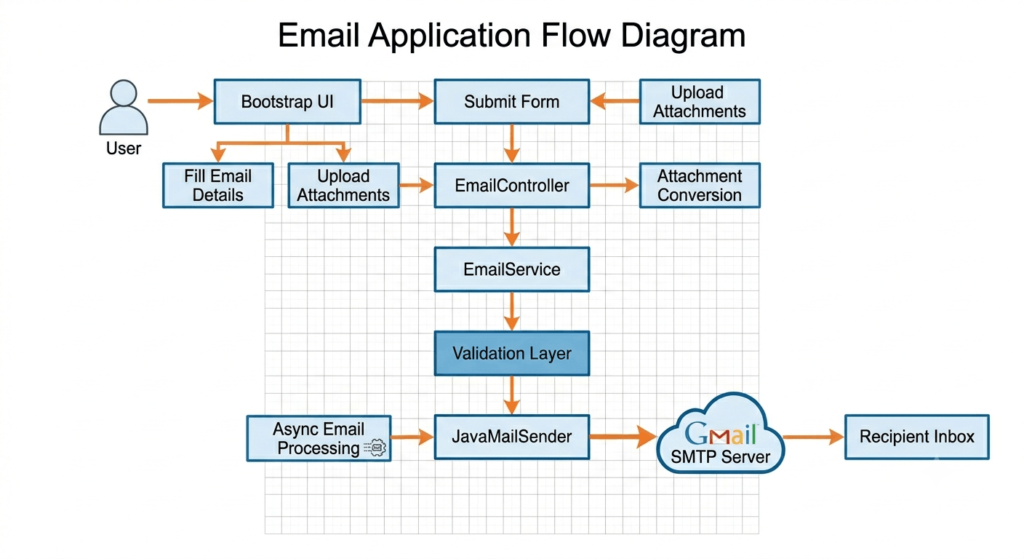
Application Flow
The following flow illustrates how the application works.
Running the Application
Start the application using Maven:
mvn spring-boot:run
Or run the main class directly from IntelliJ IDEA.
Open Browser
http://localhost:8080
The Email Sending Application UI should appear.
Test Email Sending
- Enter recipient email addresses.
- Add CC or BCC recipients if required.
- Enter subject.
- Compose HTML email content.
- Upload attachments.
- Click Send Email.
The application will process the email asynchronously and deliver it through Gmail SMTP.
Conclusion
In this tutorial, we built a complete Email Sending Application using Spring Boot, Gmail SMTP, Bootstrap, and JavaScript. The application supports HTML emails, multiple recipients, multiple attachments, asynchronous processing, validation, and proper exception handling.
This project can be used as a foundation for contact forms, notification systems, report delivery services, customer communication platforms, and other real-world applications that require email functionality.
Feel free to download the source code, customize the application, and integrate it into your own projects.