
In many real-world applications, sending emails is a common requirement. Applications often need to send notifications, account verification emails, password reset links, order confirmations, and status updates.
In this tutorial, we will build a simple Spring Boot Email Sending Application that allows users to send text-based emails through a Gmail account. The application provides a user-friendly web interface where users can enter the recipient email address, CC, BCC, subject, and message body before sending the email.
By the end of this tutorial, you will have a fully functional Spring Boot application capable of sending emails using Gmail SMTP.
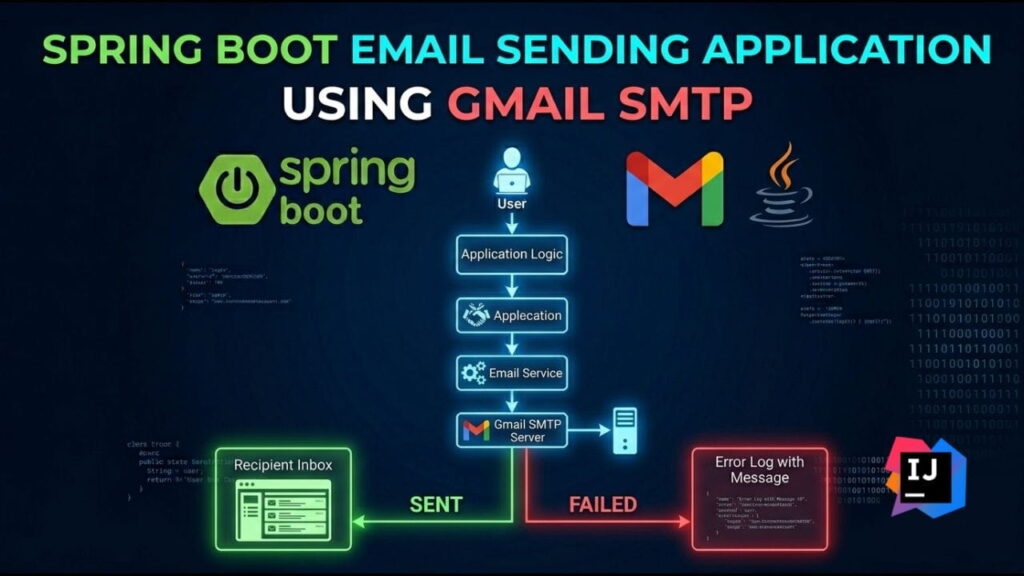
Table of Contents
Prerequisites
Before starting, ensure you have the following installed:
- Java 25
- Maven
- IntelliJ IDEA or Eclipse
- Gmail Account
- Internet Connection
Use Spring Initializer
Open Spring Initializr: http://start.spring.io/
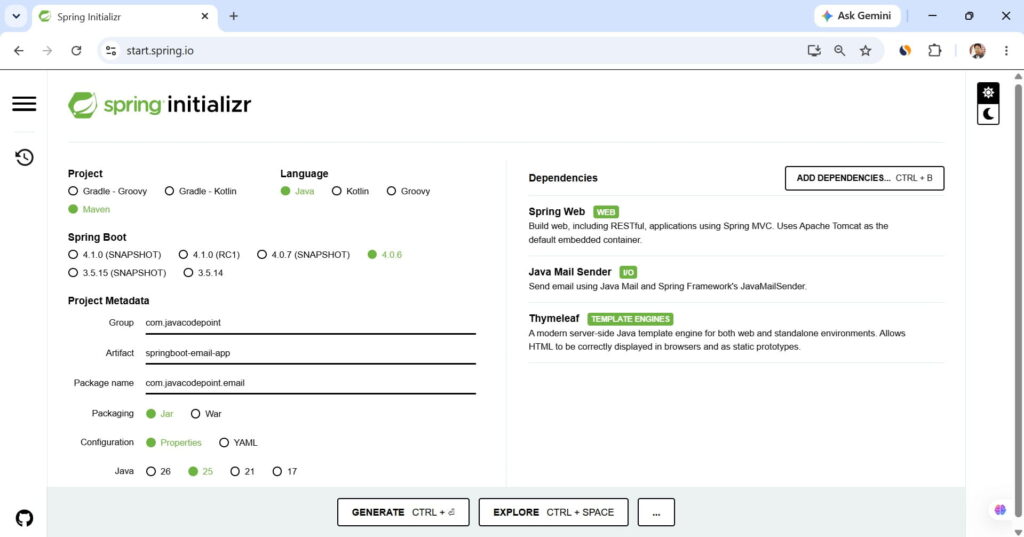
Now, generate the application > extract the zip file > open the folder in IntelliJ IDEA
Project Structure
springboot-email-app
│
├── src
│   ├── main
│   │   ├── java
│   │   │   └── com.javacodepoint.email
│   │   │       ├── controller
│   │   │       │     EmailController.java
│   │   │       │
│   │   │       ├── model
│   │   │       │     EmailRequest.java
│   │   │       │
│   │   │       ├── service
│   │   │       │     EmailService.java
│   │   │       │
│   │   │       └── SpringbootEmailAppApplication.java
│   │   │
│   │   ├── resources
│   │   │   ├── templates
│   │   │   │     email-form.html
│   │   │   │
│   │   │   ├── static
│   │   │   │     style.css
│   │   │   │     app.js
│   │   │   │
│   │   │   └── application.properties
│   │
│   └── test
│
└── pom.xmlGmail App Password Creation and Configuration
Google no longer allows applications to authenticate using your normal Gmail password. Instead, you must generate an App Password.
Step 1: Enable Two-Factor Authentication
Open your Google Account settings and enable Two-Factor Authentication.
Step 2: Generate App Password
Open the following URL: https://myaccount.google.com/apppasswords
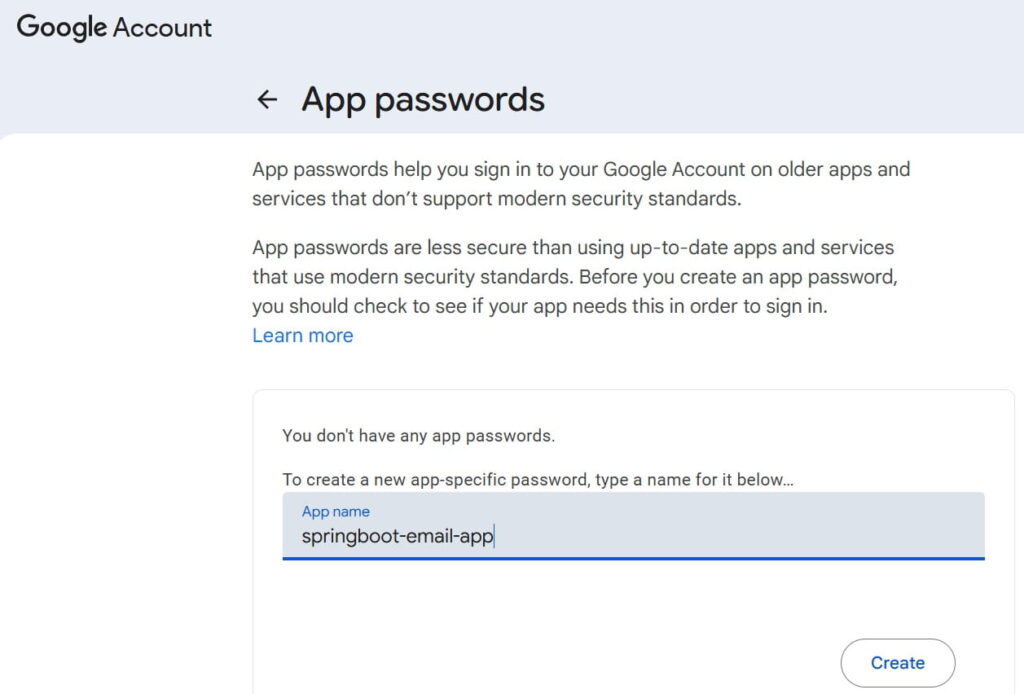
Step 3: Create a New App Password
Generate a new app password.
Example:
abcd efgh ijkl mnop
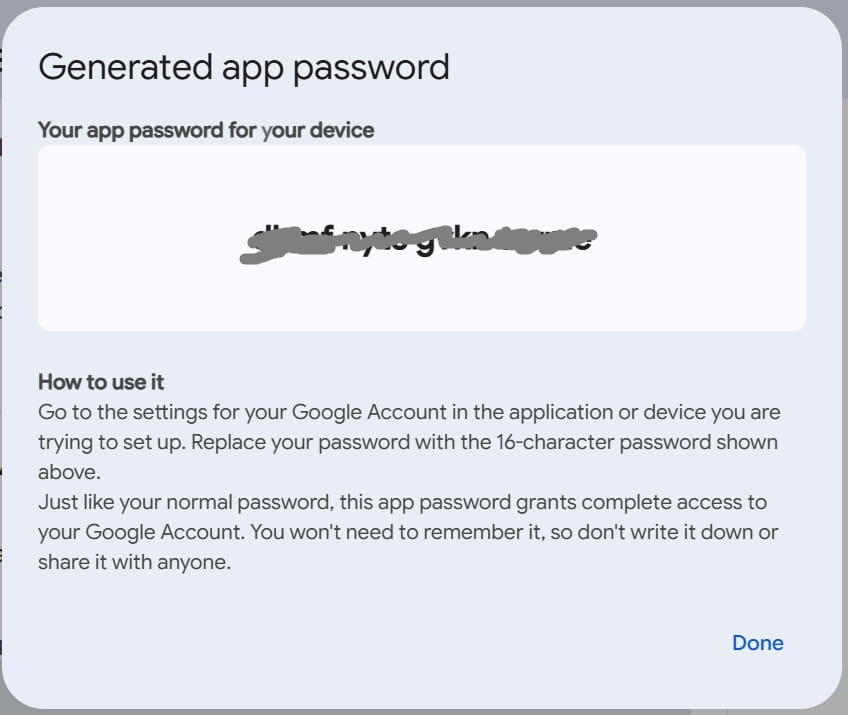
Keep this password secure because it will be used by the Spring Boot application.
Step 4: Configure Gmail SMTP
Add the following properties inside application.properties:
spring.mail.host=smtp.gmail.com
spring.mail.port=587

spring.mail.username=your-email@gmail.com
spring.mail.password=your-app-password

spring.mail.properties.mail.smtp.auth=true
spring.mail.properties.mail.smtp.starttls.enable=trueProject Files
<?xml version="1.0" encoding="UTF-8"?>
<project xmlns="http://maven.apache.org/POM/4.0.0" xmlns:xsi="http://www.w3.org/2001/XMLSchema-instance"
	xsi:schemaLocation="http://maven.apache.org/POM/4.0.0 https://maven.apache.org/xsd/maven-4.0.0.xsd">
	<modelVersion>4.0.0</modelVersion>
	<parent>
		<groupId>org.springframework.boot</groupId>
		<artifactId>spring-boot-starter-parent</artifactId>
		<version>4.0.6</version>
		<relativePath/> <!-- lookup parent from repository -->
	</parent>
	<groupId>com.javacodepoint</groupId>
	<artifactId>springboot-email-app</artifactId>
	<version>0.0.1-SNAPSHOT</version>
	<name/>
	<description/>
	<url/>
	<licenses>
		<license/>
	</licenses>
	<developers>
		<developer/>
	</developers>
	<scm>
		<connection/>
		<developerConnection/>
		<tag/>
		<url/>
	</scm>
	<properties>
		<java.version>25</java.version>
	</properties>
	<dependencies>
		<dependency>
			<groupId>org.springframework.boot</groupId>
			<artifactId>spring-boot-starter-mail</artifactId>
		</dependency>
		<dependency>
			<groupId>org.springframework.boot</groupId>
			<artifactId>spring-boot-starter-thymeleaf</artifactId>
		</dependency>
		<dependency>
			<groupId>org.springframework.boot</groupId>
			<artifactId>spring-boot-starter-webmvc</artifactId>
		</dependency>

		<dependency>
			<groupId>org.springframework.boot</groupId>
			<artifactId>spring-boot-starter-mail-test</artifactId>
			<scope>test</scope>
		</dependency>
		<dependency>
			<groupId>org.springframework.boot</groupId>
			<artifactId>spring-boot-starter-thymeleaf-test</artifactId>
			<scope>test</scope>
		</dependency>
		<dependency>
			<groupId>org.springframework.boot</groupId>
			<artifactId>spring-boot-starter-webmvc-test</artifactId>
			<scope>test</scope>
		</dependency>
	</dependencies>

	<build>
		<plugins>
			<plugin>
				<groupId>org.springframework.boot</groupId>
				<artifactId>spring-boot-maven-plugin</artifactId>
			</plugin>
		</plugins>
	</build>

</project>
package com.javacodepoint.email.controller;

import com.javacodepoint.email.model.EmailRequest;
import com.javacodepoint.email.service.EmailService;
import org.springframework.stereotype.Controller;
import org.springframework.ui.Model;
import org.springframework.web.bind.annotation.*;

@Controller
public class EmailController {

    private final EmailService emailService;

    public EmailController(EmailService emailService) {
        this.emailService = emailService;
    }

    @GetMapping("/")
    public String home(Model model) {

        model.addAttribute(
                "emailRequest",
                new EmailRequest());

        return "email-form";
    }

    @PostMapping("/send")
    public String sendEmail(
            @ModelAttribute EmailRequest request,
            Model model) {

        try {

            emailService.sendEmail(request);

            model.addAttribute(
                    "success",
                    "Email sent successfully.");

            System.out.println(
                    "Controller: Email sent successfully.");

        } catch (Exception ex) {

            System.out.println(
                    "Controller: Email sending failed.");

            ex.printStackTrace();

            model.addAttribute(
                    "error",
                    ex.getMessage());
        }

        model.addAttribute(
                "emailRequest",
                new EmailRequest());

        return "email-form";
    }
}
package com.javacodepoint.email.model;
public class EmailRequest {
private String to;
private String cc;
private String bcc;
private String subject;
private String body;
public String getTo() {
return to;
}
public void setTo(String to) {
this.to = to;
}
public String getCc() {
return cc;
}
public void setCc(String cc) {
this.cc = cc;
}
public String getBcc() {
return bcc;
}
public void setBcc(String bcc) {
this.bcc = bcc;
}
public String getSubject() {
return subject;
}
public void setSubject(String subject) {
this.subject = subject;
}
public String getBody() {
return body;
}
public void setBody(String body) {
this.body = body;
}
}
package com.javacodepoint.email.service;

import com.javacodepoint.email.model.EmailRequest;
import jakarta.mail.MessagingException;
import jakarta.mail.internet.MimeMessage;
import org.springframework.mail.MailException;
import org.springframework.mail.javamail.JavaMailSender;
import org.springframework.mail.javamail.MimeMessageHelper;
import org.springframework.stereotype.Service;

@Service
public class EmailService {

    private final JavaMailSender mailSender;

    public EmailService(JavaMailSender mailSender) {
        this.mailSender = mailSender;
    }

    public void sendEmail(EmailRequest request)
            throws MessagingException {

        System.out.println("=================================");
        System.out.println("Starting email sending process");
        System.out.println("To      : " + request.getTo());
        System.out.println("CC      : " + request.getCc());
        System.out.println("BCC     : " + request.getBcc());
        System.out.println("Subject : " + request.getSubject());
        System.out.println("=================================");

        try {

            MimeMessage message =
                    mailSender.createMimeMessage();

            MimeMessageHelper helper =
                    new MimeMessageHelper(message, true);

            helper.setTo(request.getTo());

            if (request.getCc() != null &&
                    !request.getCc().isBlank()) {
                helper.setCc(request.getCc());
            }

            if (request.getBcc() != null &&
                    !request.getBcc().isBlank()) {
                helper.setBcc(request.getBcc());
            }

            helper.setSubject(request.getSubject());
            helper.setText(request.getBody());

            mailSender.send(message);

            System.out.println("Email sent successfully.");

        } catch (MailException ex) {

            System.out.println("MailException occurred.");
            ex.printStackTrace();

            throw new RuntimeException(
                    "Unable to send email. Please verify the email addresses and SMTP configuration."
            );

        } catch (MessagingException ex) {

            System.out.println("MessagingException occurred.");
            ex.printStackTrace();

            throw ex;

        } catch (Exception ex) {

            System.out.println("Unexpected error occurred.");
            ex.printStackTrace();

            throw new RuntimeException(
                    "Unexpected error occurred while sending email."
            );
        }
    }
}
package com.javacodepoint.email;
import org.springframework.boot.SpringApplication;
import org.springframework.boot.autoconfigure.SpringBootApplication;
@SpringBootApplication
public class SpringbootEmailAppApplication {
public static void main(String[] args) {
SpringApplication.run(SpringbootEmailAppApplication.class, args);
}
}
<!DOCTYPE html>
<html xmlns:th="http://www.thymeleaf.org">
<head>
    <title>Email Sender</title>
    <link rel="stylesheet"
          href="/style.css">
</head>
<body>
<div class="container">
    <h2>Email Sender</h2>
    <div th:if="${success}" class="success">
        <span th:text="${success}"></span>
    </div>
    <div th:if="${error}" class="error">
        <span th:text="${error}"></span>
    </div>
    <form action="/send"
          method="post">

        <label>To</label>
        <input type="email"
               name="to"
               required>

        <label>CC</label>
        <input type="email"
               name="cc">

        <label>BCC</label>
        <input type="email"
               name="bcc">

        <label>Subject</label>
        <input type="text"
               name="subject"
               required>

        <label>Body</label>

        <textarea
                name="body"
                rows="10"
                required>
        </textarea>

        <button type="submit">
            Send Email
        </button>

    </form>
</div>
<script src="/app.js"></script>
</body>
</html>body {
font-family: Arial, sans-serif;
background: #f4f6f9;
}
.container {
width: 700px;
margin: 40px auto;
background: white;
padding: 30px;
border-radius: 8px;
box-shadow:
0 0 10px rgba(0,0,0,0.1);
}
h2 {
text-align: center;
}
label {
display: block;
margin-top: 15px;
}
input,
textarea {
width: 100%;
padding: 10px;
margin-top: 5px;
border: 1px solid #ccc;
border-radius: 4px;
box-sizing: border-box;
}
button {
margin-top: 20px;
width: 100%;
padding: 12px;
border: none;
background: #007bff;
color: white;
border-radius: 4px;
cursor: pointer;
}
button:hover {
background: #0056b3;
}
.success {
background: #d4edda;
color: #155724;
padding: 10px;
margin-bottom: 15px;
border-radius: 4px;
}
.error {
background-color: #f8d7da;
color: #721c24;
padding: 10px;
margin-bottom: 15px;
border-radius: 4px;
}document.querySelector("form")
.addEventListener("submit", function(event) {
const to =
document.querySelector(
"input[name='to']"
).value;
const subject =
document.querySelector(
"input[name='subject']"
).value;
const body =
document.querySelector(
"textarea[name='body']"
).value;
if(!to || !subject || !body){
alert(
"To, Subject and Body are mandatory."
);
event.preventDefault();
return;
}
const button =
document.querySelector("button");
button.innerText = "Sending...";
button.disabled = true;
});Application Flow Diagram
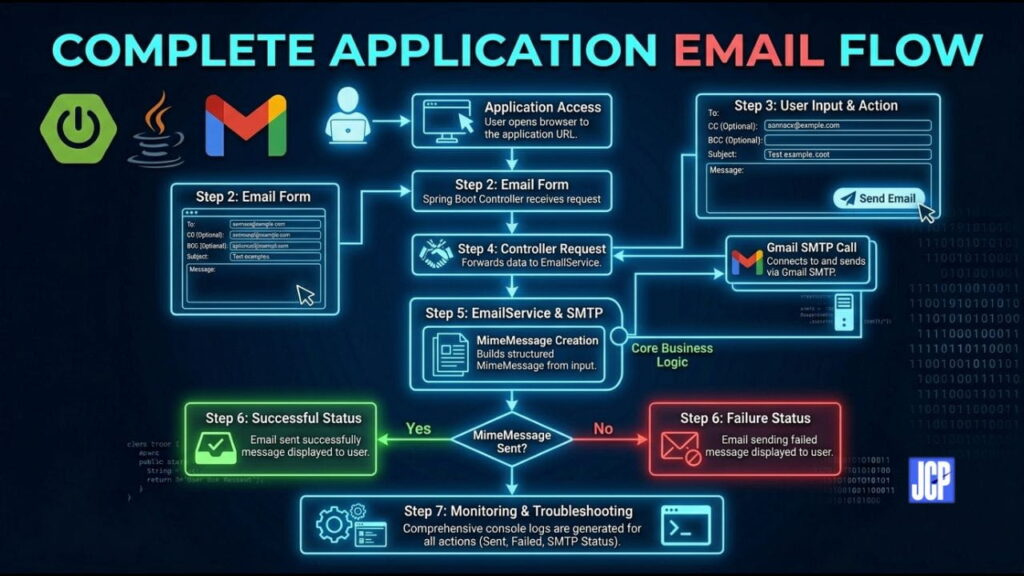
Running the Application
Start the application using Maven:
mvn spring-boot:run
Or run the main class directly from IntelliJ IDEA.
Open Browser
http://localhost:8080
Sample Input
To      : test@gmail.com
CC      : manager@gmail.com
BCC     : audit@gmail.com
Subject : Spring Boot Email Test
Body    : Hello from Spring Boot Email Application
Click the Send Email button to send the email.
Source Code Download
You can download the complete source code from GitHub:
Conclusion
In this tutorial, we developed a simple Spring Boot Email Sending Application using Gmail SMTP. We created a user-friendly interface for entering recipient details and sending text-based emails directly from a Spring Boot application.
This project demonstrates how to integrate Spring Mail with Gmail SMTP and serves as a good foundation for implementing advanced features such as HTML emails, file attachments, email templates, scheduled emails, and notification services in real-world applications.